

What are player notes?
What are player notes used for?
Player notes let you create your own notes about other poker players.
Taking notes on other players helps you to improve your gameplay in future sessions by:
- Recording observations about how opponents play
- Identifying patterns in their betting and decision-making
- Referencing your notes during future games against the same players
Player notes are stored locally on your computer.
The notes file is named notes.user.xml, where user is your username.
You can back up this file or transfer it to another computer.
How do I access player notes settings?
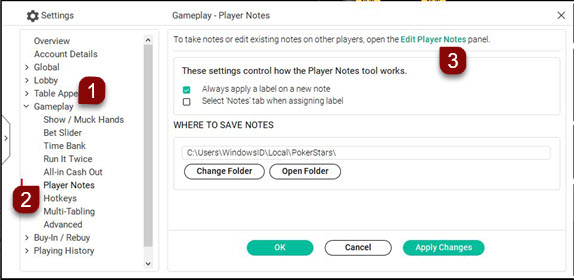
Go to:
Settings → Gameplay → Player Notes
Screenshot showing the Settings page with numbered steps (desktop)
How do I create or edit player notes?
- Go to:
- Settings → Gameplay → Player Notes
- Select 'Edit Player Notes'.
Screenshot of Player Notes showing numbered steps (desktop)
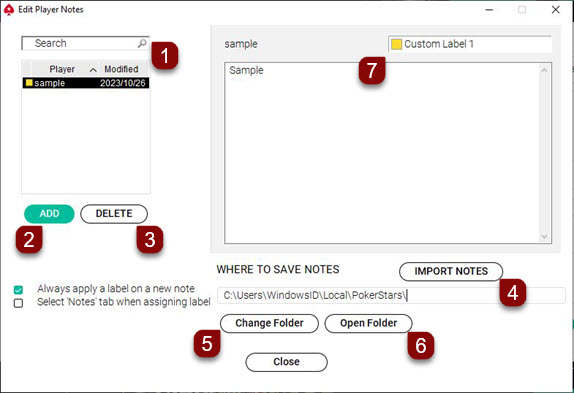
You can create new notes or edit existing ones in the editor.
What options are available in the Player Notes Editor?
- Search bar: Search through your existing notes by player username
- Add: Create a new note on a player by entering their username
- Delete: Remove the currently highlighted note
- Import Notes: Import note files from another location
- Change Folder: Select a different folder to save your notes
- Open Folder: Open the folder where your notes are currently saved
- Custom Label: Change the name and color of player note labels
How do I save player note changes?
- Select 'Close'.
- Exit the software using the X button.
Important
If the software closes unexpectedly before you exit normally, changes to player notes may not be saved.
How do I edit part of an existing player note?
You can edit specific information within a player's note without deleting the entire note.
- Go to:
- Settings → Gameplay → Player Notes
- Select 'Edit Player Notes'.
- Highlight the player ID in the left-hand window.
- Use the editing window on the right to modify or delete specific information.
- Select 'Close' to save your changes.
How do I delete all notes for a player?
- Go to
- Settings → Gameplay → Player Notes
- Select 'Edit Player Notes'.
- Highlight the player ID in the left-hand window.
- Select 'Delete'.
- Select 'Close' to save your changes.
How do I transfer player notes to another computer?
You can transfer your player notes from one computer to another by copying your notes file.
How do I export player notes from the original computer?
- Open the PokerStars software.
- From the lobby, go to 'Help' → 'Open My Settings Folder'.
- Exit the PokerStars software completely before proceeding to the next step.
- Locate your notes file (named notes.user.xml, where 'user' is your username).
- Copy this file to your destination computer using email, external hard drive, or another transfer method.
How do I import player notes to a new computer?
- Open the PokerStars software.
- Go to:
- Tools → Player Notes Editor → Import Notes
- Locate the notes file you copied.
- Select 'Open'.
Did you find this article useful?
Related Articles
- Know Your Customer verification process
- How to reinstall the PokerStars desktop software or mobile app without losing your settings and player notes.
- Finding tickets, tournaments and players
- How do I get free Play Money chips?
- Complete an interrupted game
- Opting-in to the PokerStars server restart mailing list
- Deposit with a card
- Self-exclusion and responsible gaming
- Using your account after GDPR data deletion
- Changing your account currency